How to fix big distortion when talking

The most commun cause of distortion is the microphone volume is too high.

  1. You can adjust your recording sound volume in your window control panel.


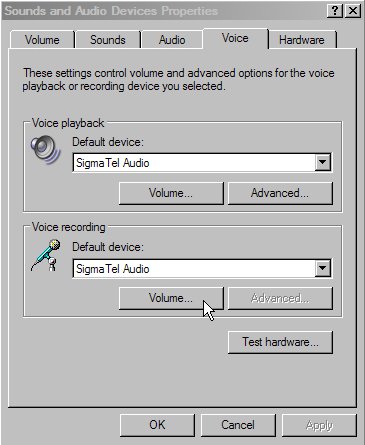
    1. Click, Start, control Panel, Sound & audio devices and go in the tab Voice.


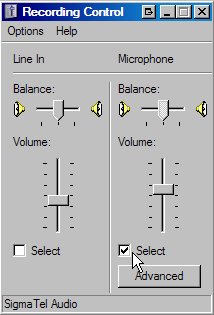
    2. Click the "Volume..." button under the recording section, and adjust your microphone input volume and be sure that the Select box under Microphone is selected and nothing else.


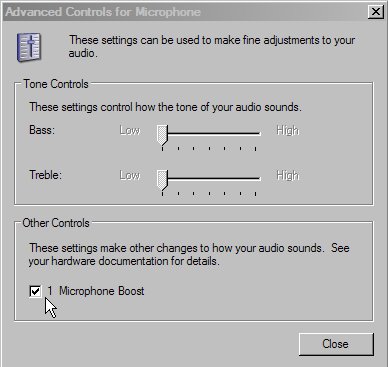
    3. You can as well if needed disable or enable the microphone boost, click the "Advanced" button under the microphone volume bar and you will have another window with a microphone boost check box.


    Still stuck? Open a trouble ticket at https://cp.light-speed.com/trouble-tickets.php or see all Ventrilo Server guides.

© Copyright 2004-2026 LightSpeed Gaming LLC
Ventrilo is a Trademark of LightSpeed Gaming LLC.

Try GameVox — next-gen voice chat for gamers (open beta)