How to allow or deny duplicate IPs in Ventrilo
This tutorial will walk you through the process of being able to allow or deny the same IP address on the Ventrilo server.
-
-
-
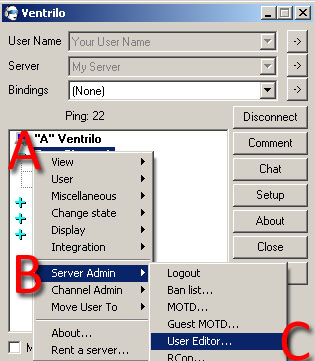
Bring up the "User Editor" window
- A) Right click anywhere in the white space in the main Ventrilo screen to open up the menu.
- B) Navigate down to "Server Admin"
- C) Click on "User Editor"
-
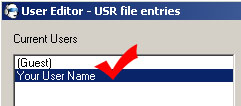
Select the user to apply the settings to
Most of users that will be connecting are considered a "guest", whether they are a "guest" in the literal sense. The (Guest) Account is where you will most likely want to add or remove the duplicate IP restriction. If you have many users added here, then you'll want to go through each individual one and set the appropriate setting for each individual user.
-
Click the "Network" tab
-
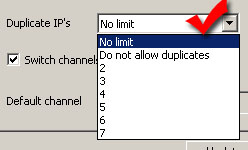
Select the Duplicate IP Limit
-
Update the settings
Click the update button in the bottom right to finalize the settings.
Still stuck? Open a trouble ticket at https://cp.light-speed.com/trouble-tickets.php or see all Ventrilo Server guides.
|