How to change my Ventrilo admin password

  1. Login to your control panel and go to the manage section of your server (How to manage my server)
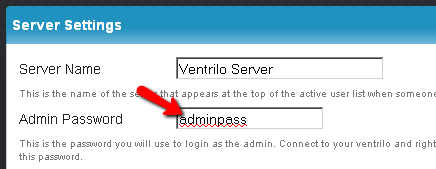
  2. Click "Server settings" on the top menu to get to the correct page. On the "Server Settings" page type in the desired password in the "Admin Password" input box and click "Save Settings and Restart Server" on the bottom of the page.

    control panel admin password

Still stuck? Open a trouble ticket at https://cp.light-speed.com/trouble-tickets.php or see all Ventrilo Server guides.

© Copyright 2004-2026 LightSpeed Gaming LLC
Ventrilo is a Trademark of LightSpeed Gaming LLC.

Try GameVox — next-gen voice chat for gamers (open beta)